Connect an AI agent to your twin
Give Claude Code, Codex or another AI agent the knowledge of one of your VEP twins. The agent reads the twin before it works. It adds something to the twin only when you explicitly ask it to remember it.
Before you start
- A VEP account with access to the twin you want to connect.
- The computer where your agent runs: macOS, Linux or Windows, with
curland Node.js installed. - Claude Code, Codex, or another agent that can run commands in a terminal.
1. Open the App Store
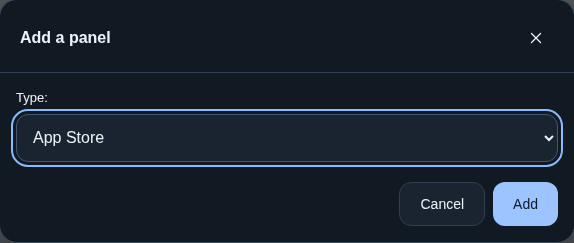
In VEP, click Add panel in the top right corner. In the Add a panel window, set Type to App Store and click Add.

2. Create a setup command
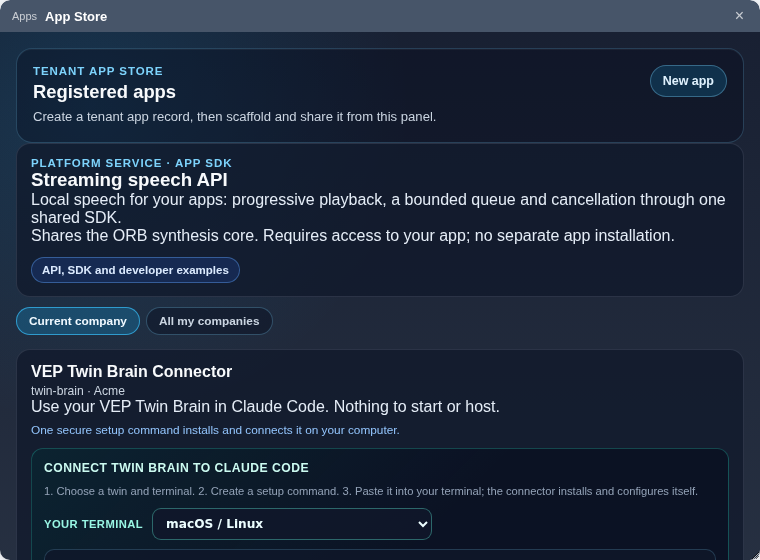
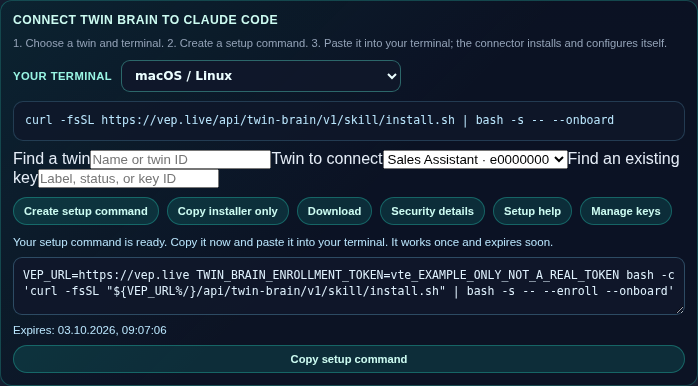
The first card in the App Store is VEP Twin Brain Connector. In its Connect Twin Brain to Claude Code section:
- Your terminal: choose macOS / Linux or Windows PowerShell.
- Twin to connect: choose the twin. Find a twin searches by name.
- Click Create setup command, then Copy setup command.
The setup command works once and expires after 15 minutes. If it expires, click Create setup command again. The section is titled for Claude Code, but the same connection works for Codex and other agents (step 4).
3. Run it on the agent's computer
Paste the command into a terminal on the computer where your agent runs and answer the setup questions. The installer verifies the connector's signature, installs it, and stores the twin's access key on this computer. Your existing Claude Code settings and hooks stay as they are.
Check the connection on macOS or Linux:
"$HOME/.claude/skills/twin-brain/twin-brain.sh" doctor
In Windows PowerShell:
& "$HOME/.claude/skills/twin-brain/twin-brain.ps1" doctor
4. Let your agent use the twin
Claude Code
Nothing else to do. With every message, Claude Code receives the twin's facts that are relevant to it.
Codex and other agents
Codex reads the AGENTS.md file of your project. Add these rules to it, or to the instructions of any agent that can run terminal commands:
## VEP twin
- Before a task, run "$HOME/.claude/skills/twin-brain/twin-brain.sh" context "<the task in one line>" and use the facts it returns.
- To look something up, run "$HOME/.claude/skills/twin-brain/twin-brain.sh" query "<question>".
- Teach the twin only when the user explicitly asks you to remember something:
  "$HOME/.claude/skills/twin-brain/twin-brain.sh" teach "<one fact>". Never teach on your own initiative.
5. Teach the twin only when you ask
Teaching is off until you turn it on for this connection:
"$HOME/.claude/skills/twin-brain/twin-brain.sh" learning on
From then on, the agent stores a fact only when you ask it to, for example "Remember: the weekly report goes out on Mondays." It runs teach with that one fact. Nothing from your conversations is sent to the twin automatically. A fact may contain a password or key; it is stored as taught.
To make a connection read-only again:
"$HOME/.claude/skills/twin-brain/twin-brain.sh" mode use-only
6. Manage access
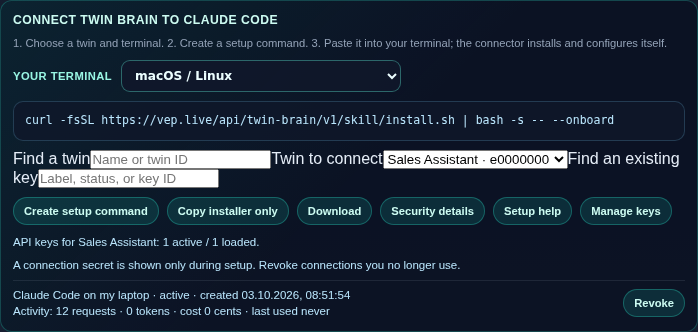
In the App Store card, choose the twin and click Manage keys. You see every connection to that twin and its activity. Revoke disconnects it at once.
Several twins on one computer
A setup command stores its key in ~/.config/vep/twin-brain.env, so a second one replaces the first. To keep several twins side by side, give each its own files when you run the setup command:
TWIN_BRAIN_CONFIG_FILE="$HOME/.config/vep/sales.env" TWIN_BRAIN_PREFERENCES_FILE="$HOME/.config/vep/sales.preferences" <paste the setup command here>
Use the same two variables whenever you run twin-brain.sh or start Claude Code for that twin.
Troubleshooting
The setup command expired
Create a new one in the App Store card (step 2). Each command works once.
doctor cannot reach VEP
Check that this computer can open https://vep.live, then run doctor again.
Teaching is blocked
Run learning on (step 5). If it still fails, open Manage keys: the connection may have been revoked. Create a new setup command to connect again.
Hide secrets in what the agent receives
The twin keeps secrets exactly as they were taught. To receive facts with passwords and keys hidden, set TWIN_BRAIN_REDACT_SECRETS=1 in the environment where the agent runs.
Technical details of the connector: VEP Twin Brain Connector.
More guides: Chat topics for your AI twin, to tag messages into topics and get answers focused on the subject.